REVIEW · ICELAND
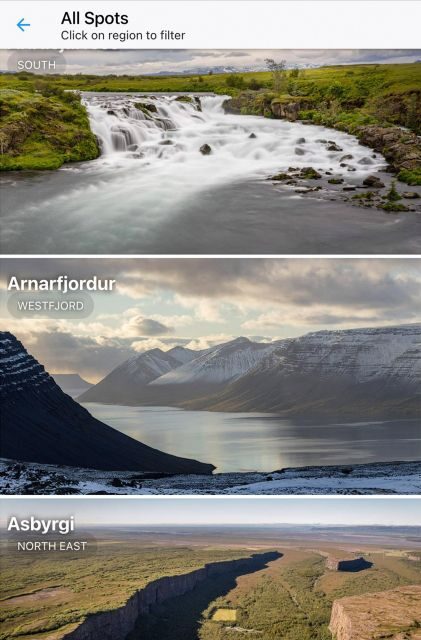
Iceland: Audioguide, Interactive map 200 spots ++
Book on GetYourGuide →Operated by My Secret Map · Bookable on GetYourGuide
A map that talks back to Iceland. This Iceland audioguide turns your drive into a story route, with real-time geolocation that helps you land on the right stop without playing guessing games. It covers famous sights and quieter places, all tied to Iceland’s legends, geology, and natural light.
I like the 5+ hours of audio you can pace at your speed, plus the fact that every track comes with a full text transcript for quick review or when you need to read instead of listen. I also appreciate the added best photo opportunity guidance, because the “best angle” matters in Iceland.
One thing to watch: it depends on your phone working properly, because continuous internet access is essential for the map, itinerary, and downloading media.
In This Review
- Key things to know before you go
- What you’re really buying: an app-based Iceland storytelling day (or week)
- Price and value: $17 for up to 6 people is the real trick
- Getting oriented fast: the interactive map and GPS geolocation
- 5+ hours of audio: what the stories are actually about
- Building a day plan with the guide’s itineraries (scenic vs quicker)
- 200++ spots in the Capital Region: how to experience them without burnout
- Photo opportunities: why those pinpoint tips are worth it
- Languages, transcripts, and how to use them when conditions are bad
- Smartphone reality check: internet, installation email, and power
- Support and reliability: quick fixes when access goes wrong
- Who this fits best (and who should think twice)
- Should you book this Iceland audioguide?
- FAQ
- Is there a pickup location?
- How much does it cost?
- How long do I have access to the guide?
- What languages are available?
- Do I need internet to use it?
- Do I get audio only, or also text?
- Is there an interactive map?
- Do I need headphones?
- Is it refundable?
Key things to know before you go
- 200++ GPS-tagged spots across Icelandic wonders, including major sights and lesser-known stops
- 5 hours of audio in English, French, and German (Italian is listed as coming soon)
- Interactive map with real-time geolocation so you can find places fast
- Itinerary guidance that connects stops and lets you think in terms of scenic vs quicker routes
- Text transcripts for every audio so you can read the story on the fly
- Photo spot recommendations designed to improve your odds in changing conditions
What you’re really buying: an app-based Iceland storytelling day (or week)
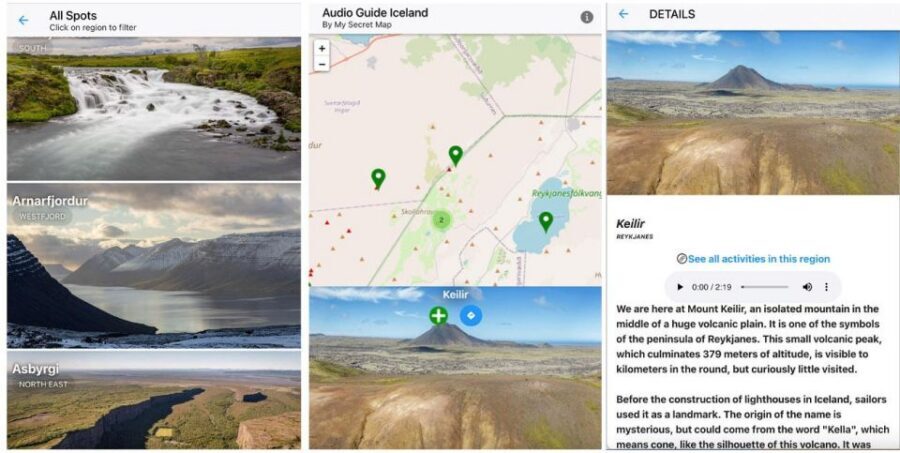
This is not a guided tour with a person meeting you at a bus. My Secret Map gives you a phone app that works as your on-demand Iceland guide. You can use it where you are, with no pickup location, which is a big deal if your schedule changes or your base shifts day to day.
The core promise is simple: you get 200++ unique spots and about 5 hours of audio tied to those stops. Instead of “look at the waterfall and go,” you’ll hear the why—sagas, geology, and how the natural world in Iceland actually works. That context turns a quick stop into something you remember, even if the weather forces you to keep moving.
The long validity period is also practical. Your pass lasts 365 days, so you’re not locked into a single day plan. If you only have energy for short walks one day, you can save the longer stops for another.
You can also read our reviews of more tours and experiences in Iceland.


Price and value: $17 for up to 6 people is the real trick
At $17 per group (up to 6 people), the value depends on how you travel.
- If you’re solo, it’s still a modest cost for a full day or two of self-guided exploring.
- If you’re traveling as a small group (friends, family, or two couples), it can become very cost-effective because you’re sharing one purchase.
The catch is that the guide is phone-based. So while the price is low, your “cost” in practice is your device setup: charged smartphone, internet access, and ideally headphones or car audio.
So the smart way to think about it is: you’re paying for structure and meaning more than you’re paying for a bus, a host, or timed entry.
Getting oriented fast: the interactive map and GPS geolocation

I like geolocation guides when they’re done right, because Iceland can be slippery, windy, and visually confusing. The guide’s interactive map uses real-time geolocation, and that helps you track where you are relative to the tagged spots.
In plain terms, this matters because:
- Roads and gravel tracks can look the same from the car.
- Iceland weather changes fast, and you don’t want to waste time re-checking directions.
- When you’re tired, you need your next step clearly explained.
The guide also includes itinerary guidance to connect locations. That’s useful because you’re not just picking random pins—you can move between stops more logically.
One practical tip: if you plan to use geolocation heavily, keep your phone battery plan real. Iceland drains phones faster than you expect, especially in cold weather and with screen brightness up.
5+ hours of audio: what the stories are actually about
The audio content is positioned around both culture and natural science. You’ll get Icelandic sagas and legend-style storytelling, but it’s paired with explanations tied to real features—especially the famous geothermal side of the country.
A few themes called out in the guide description:
- Sagas and legends (the lore side of Iceland)
- The science behind geysers (the real mechanisms, not just myths)
- Northern Lights (light, atmosphere, and timing ideas)
- Cultural and geological tales that connect the “what” to the “why”
This kind of mix is where audio guides earn their keep. If you’re standing in the same place as everyone else, context helps you see more than the photo you already have in your head.
You also control the pacing. You can listen while walking, listen from a parking spot, or skip a segment if you’re cold and want to get moving. The app format makes that easier than trying to follow a strict live commentary schedule.
Building a day plan with the guide’s itineraries (scenic vs quicker)
The guide includes tailored itineraries that connect spots. The description even points out that the app can help you think in terms of route preferences—like the most scenic path or the quickest connection between points.
Here’s how I’d use that in real life:
- Pick your base area and start point (because you can use it anywhere, you’re not stuck to a fixed meeting spot).
- Choose a “mode” for the day: scenic (more stops, more walking) or efficient (fewer stops, faster transitions).
- Let the itinerary string together nearby audio points, so you’re not bouncing between far-apart pins.
This is the difference between an audioguide that’s just a content library and one that actually helps you travel. Iceland is a place where time is precious. If you spend it lost in your phone, you don’t enjoy Iceland—you just manage batteries and signals.



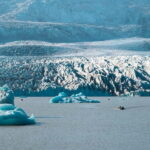
200++ spots in the Capital Region: how to experience them without burnout
The listing places the experience in Iceland’s Capital Region, which usually means Reykjavík and the surrounding areas. Even if your overall trip includes wider day trips, this kind of guide is at its best when you’re building short-to-medium stop chains where you don’t have to constantly reposition.
Because the exact stop list isn’t provided here, I can’t name each pin. But you can still expect the guide’s style to group places by theme—things like:
- Water and geothermal activity stories (including geyser-related science)
- Sky and light segments (Northern Lights guidance)
- Culture and folklore explanations tied to place
A smart way to avoid overload is to do an audio “ratio”:
- For big sights: listen to the full relevant segment.
- For smaller pull-offs: grab the shorter story parts and move on.
- For photo stops: listen briefly, then step out for the shot window.
That approach keeps the day enjoyable even when the weather turns. Iceland punishes over-planning, and an audio guide should flex with you.
Photo opportunities: why those pinpoint tips are worth it
One nice add-on is dedicated recommendations for best photo opportunities. In Iceland, light can be moody, fog can roll in, and what looked like a good view five minutes ago can turn into a blank wall.
Photo guidance helps you in two ways:
- It reminds you where the angle matters, not just that a place exists.
- It encourages you to slow down for the shot instead of rushing past in a photo-blind dash.
In practice, use the photo advice as a checklist:
- Stop where the guide implies you’ll get the angle.
- Expect wind and mist.
- Keep your gear simple: stable stance, quick shutter habits, and a phone/camera battery plan.
Languages, transcripts, and how to use them when conditions are bad
The app offers audio in English, French, and German. You also get full textual transcripts for all audio content, which is genuinely useful.
Why transcripts matter:
- If you’re outside in cold weather, you can read the story in short chunks.
- If audio is unclear due to wind or traffic noise, you’re not stuck.
- You can re-check details later, like what a feature was doing or why it matters.
This also helps when you’re traveling with different preferences. One person listens, another reads. Same place, different style—without the group waiting on one device.
If you need to switch languages, the guide lists English, French, and German, with Italian mentioned as soon.
Smartphone reality check: internet, installation email, and power
There’s no hiding from it: continuous internet access is essential for the map, itinerary, and download media. The “not included” section calls out that internet connection is needed, and the important info is clear that you should plan for connectivity.
Also plan for the install timing:
- After booking, you’ll receive an email with instructions to install the app.
- That email might take up to 24 hours to arrive.
So if you’re the type who books late and expects everything instantly, build in time. Iceland is busy season in many parts, and you don’t want setup to steal your first exploring day.
And keep your phone ready:
- Bring a charged smartphone
- Consider headphones or connecting audio in your car if that fits your travel style
- Use a portable charger if you plan to run GPS and screen brightness for long stretches
Support and reliability: quick fixes when access goes wrong
The rating is 3.9 from 27 reviews, which suggests a solid but not perfect experience overall. The most specific positive note in the provided review is about access: a verified booking described the company as flexible and that they received a new access quickly after they made a mistake that prevented use of the guide.
That’s a good sign for a phone-based product. When apps fail, the difference between “it’s broken” and “it’s fixed” is huge.
Still, I’d treat the guide as something you test before you head out into cold, windy conditions. Once you understand how it works in one calm hour, you’ll trust it more on the road.
Who this fits best (and who should think twice)
This guide is a strong fit if you:
- Like road-trip freedom and don’t want a set tour timetable
- Want context for Iceland’s geology and stories, not just a list of viewpoints
- Enjoy the idea of 200++ stops and building a custom route
- Travel with a small group and can share the value (up to 6 people)
It may be less ideal if you:
- Plan to spend most of your time where your internet signal is weak
- Don’t want to deal with charging and app setup
- Prefer offline maps and fully offline content (this guide requires internet for key functions)
One more practical note: it’s listed as wheelchair accessible, but the actual stops you choose will still involve terrain and weather. The app helps with information; it can’t change the ground outside.
Should you book this Iceland audioguide?
Book it if you want to turn “I’m driving around Iceland” into “I understand what I’m seeing.” The combination of GPS map support, 200++ spots, 5+ hours of audio, and transcripts gives you both structure and flexibility, which is exactly what self-guided travel needs.
Skip it (or use it only when you have strong connectivity) if your trip plan can’t support continuous internet or if you’re worried about phone battery management. In Iceland, that’s not a minor detail. It’s the difference between smooth storytelling and stop-start frustration.
If you do book, my advice is to:
- plan one short test outing close to where you’re staying,
- charge your phone before you leave,
- and treat the photo tips as optional bonuses, not stress triggers.
FAQ
Is there a pickup location?
No. The guide can be used everywhere, and there is no pickup location.
How much does it cost?
It is priced at $17 per group, up to 6 people.
How long do I have access to the guide?
The duration is listed as 365 days, with availability depending on starting times.
What languages are available?
The audio guide is available in German, French, and English.
Do I need internet to use it?
Yes. The important info says continuous internet access is essential to use the map, itinerary, and download media.
Do I get audio only, or also text?
You get full textual transcripts alongside the audio content.
Is there an interactive map?
Yes. The guide includes an interactive map with real-time geolocation.
Do I need headphones?
Headphones or car audio connectivity is advised for the best audio experience.
Is it refundable?
Free cancellation is listed, with cancellation up to 24 hours in advance for a full refund.